How to reduce checkout abandonment in PrestaShop
About 70% of online carts never become an order. Here is where PrestaShop shoppers drop out, which back office settings fix it, and when a shorter checkout path is worth adding.
By the HiPresta teamPublished 12 min readChecked with PrestaShop 9.1
Listen to this article
17 min · AI voice
Short answer
To reduce checkout abandonment in PrestaShop, first measure where shoppers leave, then remove what stops them: turn on guest checkout, delete the form fields you do not need, show delivery costs before the checkout, offer the payment methods your customers expect, make errors easy to fix on a phone, and shorten the path from the product page to the order.
Key takeaways
- About 70% of online shopping carts are abandoned. Baymard Institute's average across 50 studies is 70.22%.
- Among shoppers who meant to buy, the top reasons are extra costs (40%), slow delivery (20%), distrust of the payment step (19%), forced account creation (18%) and a long checkout (17%).
- Most fixes are free settings in the PrestaShop back office: guest checkout, required fields, address format, free shipping threshold, postal code formats.
- The standard PrestaShop path puts a cart popup, a cart page and a four-step checkout between the product and the order. A Buy Now button with an express checkout removes those extra screens.
- Change one thing at a time and compare the same funnel before and after.
In this article
Why do shoppers abandon the checkout?
The Baymard Institute has collected cart abandonment studies since 2006. Its current figure, the average of 50 studies, is 70.22%: seven carts out of ten are never paid for.
Not all of them are lost sales. In Baymard's survey, 42% of US online shoppers said they had abandoned a cart simply because they were browsing or not ready to buy. No checkout change will convert those visits. The remaining shoppers wanted to order and gave a reason for stopping:
| Reason | Share of shoppers |
|---|---|
| Extra costs too high (shipping, taxes, fees) | 40% |
| Delivery was too slow | 20% |
| Did not trust the site with card details | 19% |
| The site required an account | 18% |
| Checkout too long or complicated | 17% |
| Errors or a crash on the site | 17% |
| Unsatisfactory returns policy | 13% |
| Could not see the total cost up front | 12% |
| Card was declined | 10% |
| Not enough payment methods | 9% |
Read that list as a to-do list. None of the reasons is about the product itself. They are about cost surprises, delivery, forms, trust and friction, and a merchant has a say in every one of them.
Baymard estimates that the average large ecommerce site can gain a 35.26% increase in conversion rate through better checkout design alone. Your own number will differ, but the direction holds for a shop of any size: orders you already earned are being lost in the last few screens.
What does the standard PrestaShop checkout ask of a shopper?
Since version 1.7, PrestaShop's checkout sits on a single page with four steps that open one after another: Personal Information, Addresses, Shipping Method and Payment. PrestaShop 8 and 9 keep the same structure. It is a sound checkout, and most of this guide is about tuning it rather than replacing it.
The friction starts before that page. A shopper who clicks Add to cart sees a confirmation popup, goes to the cart page, clicks Proceed to checkout again, and only then reaches the first of the four steps. Each of those is a page to load on a phone and a moment to reconsider.
Standard path
- Product page
- Cart popup
- Cart page
- Personal Information
- Addresses
- Shipping Method
- Payment
A popup and two page loads before the first form field.
Express path
- Product page
- Address
- Delivery
- Payment
The checkout opens in a window on the product page.
The seven steps below start with the fixes that cost nothing and end with the one that changes the path itself.
Step 1: Find out where your shoppers leave
Fix the biggest leak first, and to find it you need the funnel, not a single abandonment rate.
- With Google Analytics 4, the ecommerce events
add_to_cart,begin_checkout,add_shipping_info,add_payment_infoandpurchasegive you the drop between each step, and the Checkout journey report shows them as a funnel. PrestaShop does not send these events on its own, so you need a tracking module such as Google Analytics 4 for PrestaShop. - Without analytics, open Orders > Shopping Carts in the back office. Carts that never became an order are labelled there, with the customer when one is known.
- In both cases, place an order yourself, on a phone, as a new guest. Count the fields and the taps. Nothing shows friction faster.
How to read the funnel: a drop right after the checkout starts points to the account and address forms (steps 2 and 3). A drop at delivery points to costs or delivery times (step 4). A drop at payment points to missing methods, trust or errors (steps 5 and 6). Few shoppers reaching the checkout at all points to the path before it (step 7).
Step 2: Let customers order without an account
Being forced to create an account stops 18% of shoppers who were ready to buy. In PrestaShop it is one switch:
- Go to Shop Parameters > Order Settings.
- Set Enable guest checkout to Yes.
- Save.
The first checkout step now offers Order as a guest. You do not lose the customers who want an account: the guest form keeps an optional password field, so they can still create one in the same step.
Step 3: Remove the form fields you do not need
Baymard counts 23.48 form elements in the average US checkout and finds that an ideal flow needs only 12 to 14. Every field you remove is one less thing to type on a phone keyboard and one less place for an error.
PrestaShop spreads these settings over three screens:
- Shop Parameters > Customer Settings: turn off Ask for birth date and Enable partner offers unless you really use them.
- Customers > Addresses > Set required fields for this section: make sure nothing is required that you can ship without, such as a company or a second phone number.
- International > Locations > Countries, then edit a country: the Address format box decides which address lines the checkout shows for that country. Remove the lines you never use, for example the second address line or the company for a consumer shop.
Step 4: Show the full cost before the checkout
Extra costs are the number one reason by a wide margin (40%), and another 12% leave because they cannot see the total early enough. The cure is not always cheaper delivery. It is delivery that does not come as a surprise.
- Say what delivery costs before the cart. A line on the product page ("Delivery from 4.90 €, free from 50 €") answers the question before it becomes an objection.
- Keep the rules simple. A flat rate, or free delivery above an amount, is easy to state and easy to remember. Set the amount in Shipping > Preferences > Free shipping starts at.
- Show progress toward free delivery in the cart. A free shipping progress bar turns the threshold into a reason to add one more item.
- Give delivery times, not only prices. Slow delivery is the second reason on the list (20%). Fill in the Transit time of each carrier in Shipping > Carriers with a time you can keep.
- Show consumer prices with tax included, so the total in the checkout matches the price on the product page.
Step 5: Offer the payment methods your customers expect
Three reasons on the list meet at the payment step: 19% do not trust the site with their card, 10% see their card declined, and 9% do not find a method they want to use.
- Cover the basics: cards, one wallet such as PayPal, and the local method of each market you sell in (Bancontact in Belgium, iDEAL in the Netherlands, and so on). A second method also rescues the order when a card is declined.
- Use maintained payment modules from the payment provider itself or from PrestaShop. An outdated module is the usual cause of a payment step that fails without an explanation.
- Show familiar logos and a short reassurance line near the payment choice: secure payment, delivery time, returns. PrestaShop's customer reassurance block does this on the product and cart pages.
- Link the returns policy where the decision is made. An unsatisfactory returns policy stops 13% of shoppers. A plain "30 days to return" next to the order button does more than a legal page nobody opens.
Step 6: Make mistakes easy to fix, especially on phones
Errors and crashes account for 17% of abandoned orders, and the checkout is where a small bug costs the most.
- Check postal code formats. In International > Locations > Countries, each country has a ZIP/Postal code format. A wrong pattern rejects valid addresses, and the shopper has no way around it.
- Keep the last step short. One Terms of service checkbox is enough. Enable final summary, in Shop Parameters > Order Settings, adds an overview of the addresses, the delivery and the cart before the order button. PrestaShop marks it as required in some European countries: keep it where that applies to your market, and add nothing else after it.
- Test after every module install or update. Checkout, payment and shipping modules all touch the same page. Place a test order as a guest and as a logged-in customer each time.
- Test on a real phone. Check that the keyboard matches the field (digits for the phone number, an @ key for the email), that error messages are visible without scrolling, and that the order button is not hidden behind a chat bubble or a cookie banner.
Step 7: Shorten the path from the product page to the order
Steps 2 to 6 improve the checkout page. They do not change how many screens come before it. For a shopper who arrives on a product page from an ad or a search result and wants that one product, the popup, the cart page and the second "Proceed to checkout" click are pure overhead.
PrestaShop has no built-in setting to skip them, so this is the one step that needs a module. There are two kinds:
| Standard checkout | One-page checkout module | Express checkout window | |
|---|---|---|---|
| Where the checkout starts | On the checkout page, after the cart | On the checkout page, after the cart | On the product page |
| Screens before the first field | A popup and the cart page | A popup and the cart page, unless the module also skips the cart | None |
| What happens to the standard checkout | It is the checkout | Replaced | Kept, as the route for larger carts |
| Best for | Carts with several products | Shops that want all fields on one screen | Single-product and mobile orders |
A one-page checkout module replaces PrestaShop's checkout page with its own, usually showing every field at once. An express checkout, often behind a Buy Now button, adds a second, faster route and leaves the standard checkout in place. The second kind is the smaller change: nothing your existing customers know is taken away.
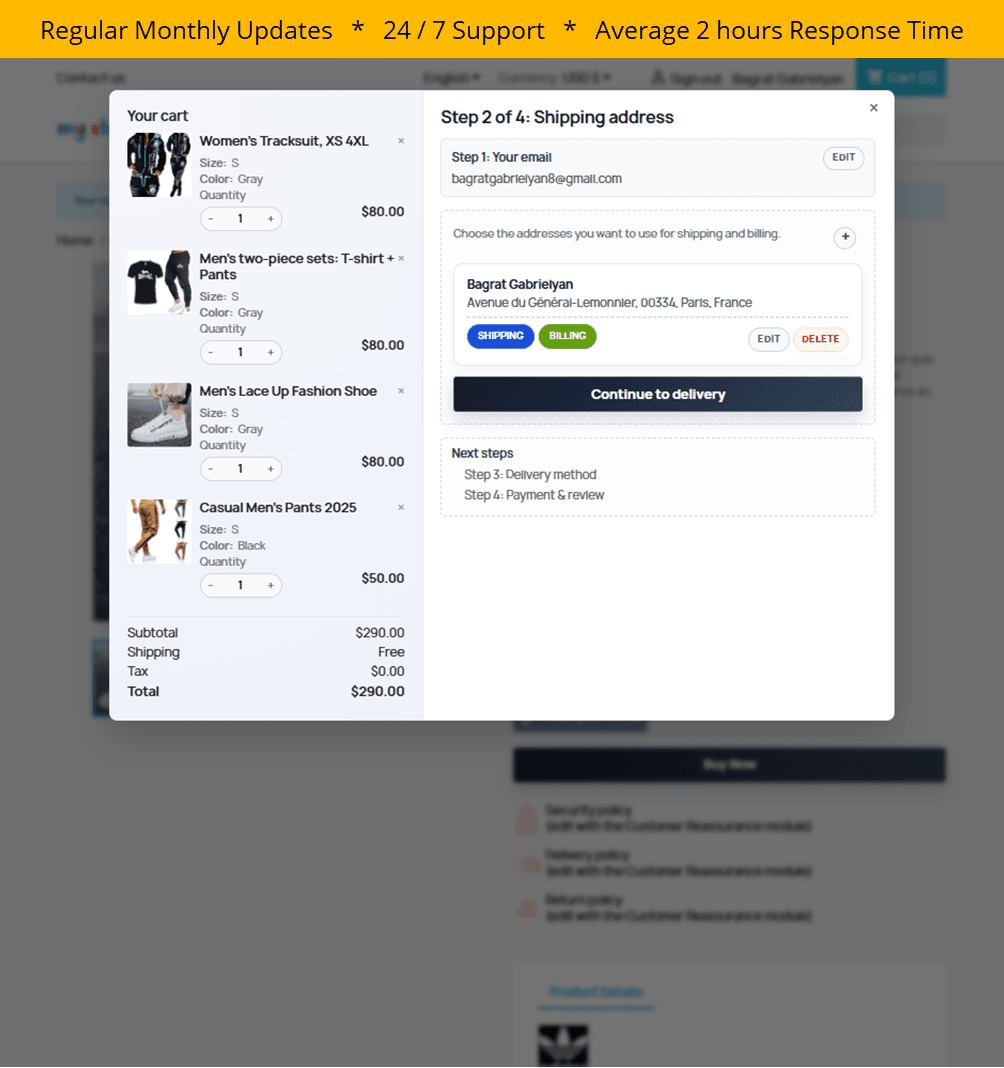
Whichever module you choose for this step, check four things before you rely on it:
- It reuses your shop's rules. Carriers, payment methods, taxes, cart rules and terms should come from PrestaShop itself, so both checkouts always agree.
- Guests can order with very little. An email address to start, an account only if the shopper wants one.
- It tells you whether it works. You need the orders, the revenue and the drop-off per step for the new route, separately from the standard checkout.
- You can test it privately. A way to show it only to your own IP address before customers see it.
Express Checkout covers these four points and runs on PrestaShop 1.7, 8 and 9. It is also honest about its limit: when a payment method can only finish on the full checkout page, the shopper gets a link to continue there with the same cart.
PrestaShop checkout abandonment checklist
The same seven steps as a table to work through:
| Fix | Where in PrestaShop | Reason it addresses |
|---|---|---|
| Read the checkout funnel | Analytics, or Orders > Shopping Carts | Shows which fix comes first |
| Enable guest checkout | Shop Parameters > Order Settings | Required account (18%) |
| Drop birth date and partner offers | Shop Parameters > Customer Settings | Long checkout (17%) |
| Review required address fields | Customers > Addresses | Long checkout (17%) |
| Trim the address format per country | International > Locations > Countries | Long checkout (17%) |
| Set a free shipping threshold | Shipping > Preferences | Extra costs (40%) |
| Add carrier transit times | Shipping > Carriers | Slow delivery (20%) |
| Add a wallet and a local payment method | Payment modules | Payment methods (9%), declined cards (10%) |
| Link the returns policy near payment | Theme or reassurance block | Returns policy (13%), trust (19%) |
| Check postal code formats | International > Locations > Countries | Errors (17%) |
| Add a Buy Now button with an express checkout | Module | Long checkout (17%) |
Make one change, wait until you have a comparable number of checkouts, and read the same funnel again. If you change five things in a week, you will not know which one moved the number. For the wider picture, from product listing to cart recovery, see our guide to the best PrestaShop conversion modules.
Frequently asked questions
What is a good checkout abandonment rate?
There is no universal target. The Baymard Institute's average cart abandonment rate across 50 studies is 70.22%, with individual studies ranging from 55% to 84%. Checkout abandonment, which counts only shoppers who started the checkout, is lower than cart abandonment. The useful comparison is your own rate before and after each change.
Does PrestaShop have a one-page checkout?
Partly. Since PrestaShop 1.7, the standard checkout is a single page with four steps that open one after another: Personal Information, Addresses, Shipping Method and Payment. Shoppers still go through a cart popup and a cart page before reaching it. Showing all fields at once, or opening the checkout on the product page, requires a module.
How do I enable guest checkout in PrestaShop?
In the back office, go to Shop Parameters > Order Settings, set Enable guest checkout to Yes and save. The first checkout step then offers Order as a guest. The guest form keeps an optional password field, so shoppers who want an account can still create one.
Does guest checkout reduce repeat purchases?
Not in a way that outweighs the orders it saves. 18% of shoppers who intended to buy abandon because a site requires an account. In PrestaShop a guest can still set a password during checkout to create an account, and you keep the email address for order updates either way.
How do I add a Buy Now button to PrestaShop?
PrestaShop has no built-in Buy Now button, so you need a module. An express checkout module adds a button next to Add to cart that adds the selected product and opens the checkout straight away. HiPresta Express Checkout does this in a window on the product page, for PrestaShop 1.7, 8 and 9.
What is the difference between cart abandonment and checkout abandonment?
Cart abandonment counts every shopper who added a product to the cart and did not order. Checkout abandonment counts only those who started the checkout and did not complete it. Checkout abandonment is the smaller number and the better measure of checkout problems, because those shoppers had already decided to buy.
Sources
- 50 Cart Abandonment Rate Statistics, Baymard Institute
- Measure ecommerce, Google Analytics developer documentation